Dashboard
Welcome back! Here's your bot overview.
Your Bot
No bot configured
π Activity Log
No activity to display yet
Welcome back! Here's your bot overview.
No activity to display yet
Enter your Discord bot credentials to get started
Pick the easiest option for you. You can switch later.
Invite our bot to your server, then run /claim to get a code.
After inviting, run /claim in your server to generate a claim code.
Enable Developer Mode in Discord, right click your server, Copy Server ID.
Run /claim in your server to get a 6-digit code (expires in 10 minutes).
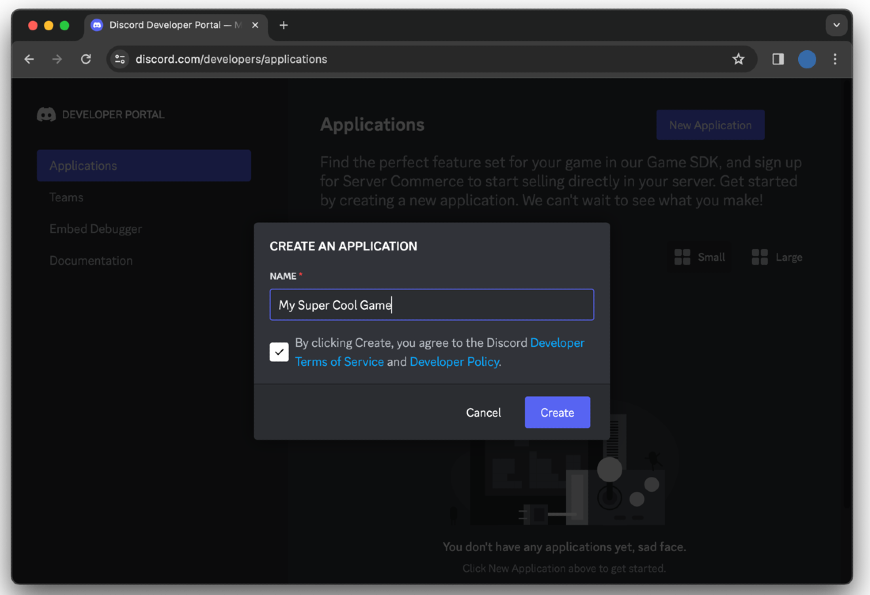
Go to the Discord Developer Portal and create a new application, then add a bot.
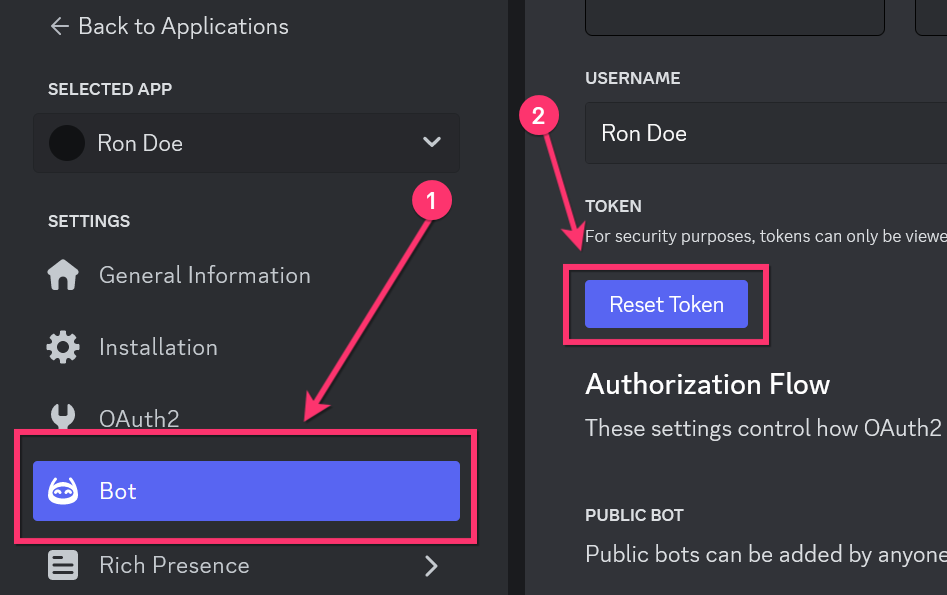
Go to the "Bot" section, click "Reset Token" and copy it. Keep this secret!
Your bot token is like a password - never share it publicly!
Go to "OAuth2" β "General" to find your Client ID and Client Secret.
Found under OAuth2 β General. Click "Reset Secret" if you don't have one.
Pick the essentials so your panel and tickets work immediately.
Hold Ctrl (Windows/Linux) or Cmd (Mac) to select multiple.
These are Discord category channels where ticket channels will be created.
Your bot is connected. Finish setup by sending your first ticket panel so users can open tickets.
Hereβs the quickest way to get your server set up.